



Download TuneWiki – Music, Lyrics, Album Art, YouTube Integration
Overview
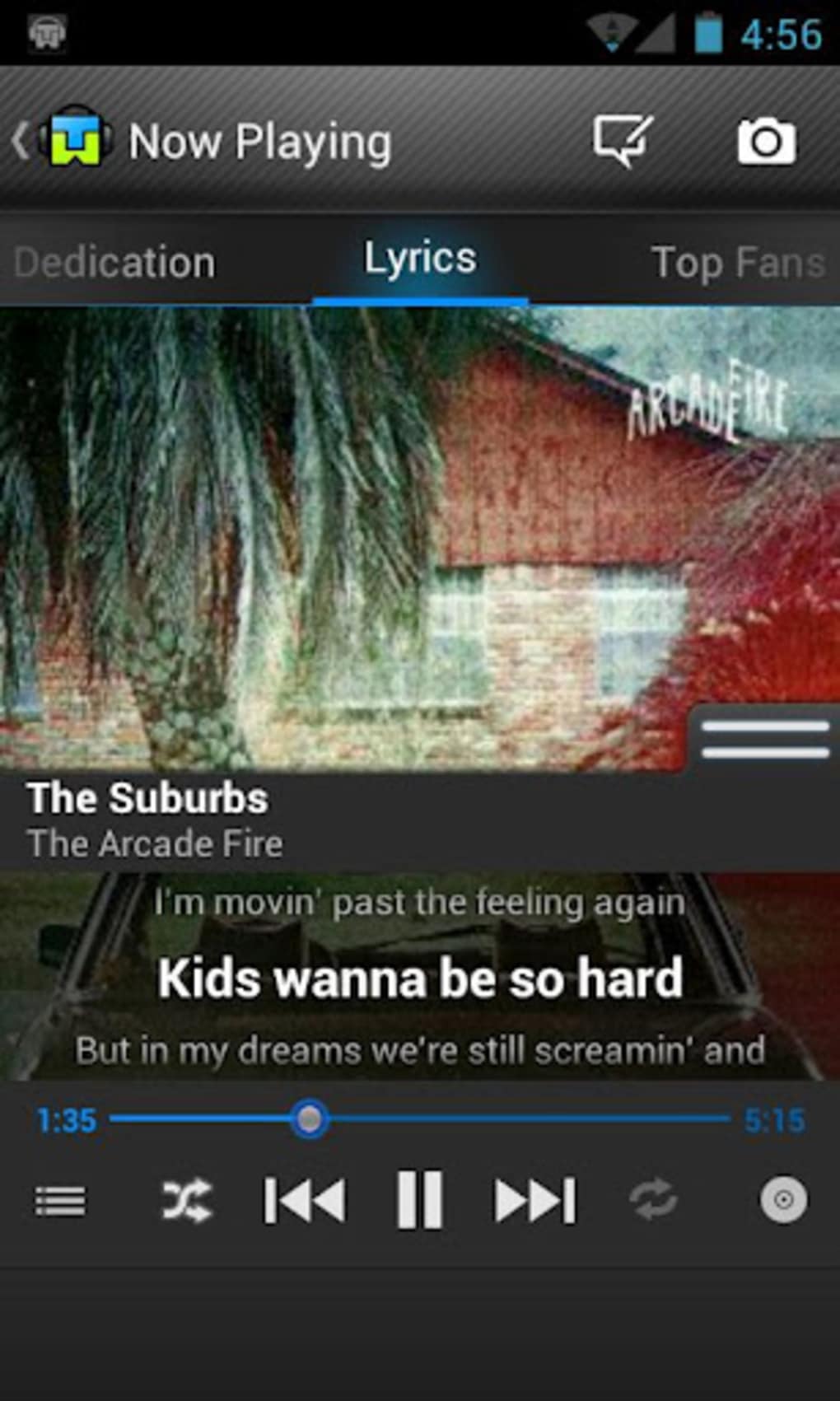
TuneWiki is a desktop music application designed to enhance the mobile music experience by offering real-time lyrics synchronization, album art retrieval, and seamless integration with multimedia platforms. The software is tailored for music enthusiasts who seek more than basic playback functionality, aiming to enrich listening sessions with interactive features. It solves common user frustrations such as missing lyrics, lack of visual engagement, and limited music discovery tools. By providing synchronized lyrics that highlight each line as it’s sung, TuneWiki transforms passive listening into an immersive experience.
The target audience includes casual listeners, avid lyric fans, and users who enjoy discovering new music through community-driven playlists and recommendations. The developer, TuneWiki, has positioned the app as a community-focused tool that encourages user contributions, particularly in correcting or adding lyrics. Real-world usage scenarios include using the app during commutes, workouts, or evening relaxation, where synchronized lyrics and visual feedback improve engagement. The app also supports offline playback, allowing users to enjoy music without an internet connection.
Key Features & Capabilities
- Synchronized Lyrics Display – Real-time highlighting of lyrics as songs play, enabling users to follow along with the music. The feature supports manual editing and flagging of incorrect lyrics for community correction.
- Album Art Finder – Automatically retrieves and displays high-quality album artwork, enhancing the visual presentation of the music library.
- YouTube Integration – Direct access to official music videos from YouTube, allowing users to watch alongside playback.
- Community-Driven Features – Users can explore popular songs, create playlists, and discover new music through community-generated data and search tools.
- Sleep Timer – Enables automatic playback termination after a set duration, ideal for users who fall asleep while listening.
- Manual Lyrics Sync & Upload – Users can manually add or adjust lyrics, ensuring accuracy for songs not covered by the default database.
These features are particularly useful in scenarios where users want to learn new songs, sing along during events, or explore music beyond their personal library. The ability to flag incorrect lyrics promotes collaborative content improvement, making the app more accurate over time. The integration with YouTube and Last.fm extends functionality beyond playback, turning TuneWiki into a multimedia hub for music lovers.
User Interface, Workflow & Performance
The user interface is structured around a clean, intuitive layout focused on music playback and metadata display. Navigation is primarily touch-based, with options accessible through long-press gestures on song or album entries. This workflow allows users to quickly access advanced functions like lyrics editing, playback controls, and media sharing.
While the app’s interface is functional, some users may find it occasionally inconsistent or visually dated, particularly when compared to modern music players. However, the core workflow remains efficient, with minimal steps required to access key features. Performance observations are based on general software behavior patterns; the app operates smoothly under typical conditions, though exact resource usage details were not specified. Stability appears adequate for regular use, though occasional glitches may occur, as noted in the developer’s changelog.
Compatibility & System Requirements
TuneWiki is designed for Android devices, supporting the platform as listed. The application has a file size of 14.5 MB, indicating a lightweight footprint suitable for most mobile devices. The software version is 2.3.4, released on April 15, 2023. Compatibility information was partially provided, with no additional details on minimum Android versions or hardware specifications. The developer did not specify resource usage details, such as RAM or CPU consumption, nor did they list required permissions or storage needs.
Pros and Cons
Pros
- Real-time synchronized lyrics with highlighting
- Community-driven lyric correction and updates
- Seamless YouTube and Last.fm integration
- Automatic album art retrieval
- Free to download and use
- Includes a sleep timer for bedtime listening
Cons
- Interface may feel outdated or inconsistent
- Limited system requirements and compatibility details
- No official support for desktop operating systems
- Performance optimization details not publicly available
- Manual lyric editing required for some songs
FAQ Section
Is TuneWiki available for Windows or Mac?
TuneWiki is currently designed for Android devices only. There is no official desktop version available for Windows or Mac.
Is the app free to use?
Yes, TuneWiki is available at no cost. The app is free to download and use without in-app purchases or subscription fees.
Can I contribute lyrics to the database?
Yes, users can manually add or edit lyrics and flag incorrect ones. The app uses community input to improve accuracy over time.
Does TuneWiki require an internet connection?
Basic playback functions work offline. However, features like lyrics lookup, album art retrieval, and YouTube integration require an active internet connection.
How often are updates released?
Updates are released periodically, with recent improvements focused on bug fixes, performance enhancements, and user experience refinements. The latest version is 2.3.4, released on April 15, 2023.
Final Thoughts + CTA
TuneWiki stands out in the crowded music app market by delivering a unique blend of interactive lyrics, community engagement, and multimedia integration. While its interface may lack modern polish, its core features—especially synchronized lyrics and YouTube support—offer tangible value to music fans. The app’s free model and active user community make it a compelling choice for Android users seeking a richer listening experience. For those who enjoy singing along, discovering new music, or simply enhancing their mobile music library with visuals and data, TuneWiki delivers meaningful functionality without cost.
Download TuneWiki now






.png)
